
The Guardian - US & World News
Guardian News & Media LtdNews & Magazines
4.520.85K Reviews
- Version
- Varies With Device
- Installs
- 5.00M
- Age Rating
- Everyone 10+
Screenshots

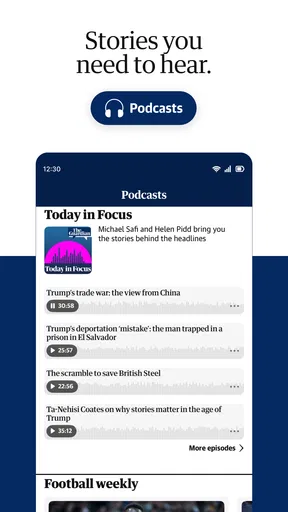
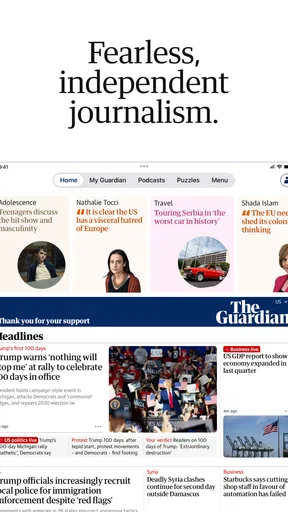

Our Review of The Guardian - US & World News
 Analysis by Appyee
When I choose a news app, I want more than a stream of urgent headlines. I want a dependable place to understand what is happening, find reporting beyond my usual interests, and decide when to catch up without turning every spare moment into a breaking-news check. The Guardian - US & World News is strongest for readers who value international coverage, opinion and analysis alongside sport, podcasts and puzzles. It is less suited to someone who wants only a bare, highly filtered headline feed.
Start with the kind of news routine you want
The Guardian is a free news and magazine app from Guardian News & Media Ltd, with optional in-app purchases ranging from $0.99 to $144.99 per item. It has a 4.6 average from around 405,000 ratings, and more than five million installs. Those figures suggest it has found a large audience, but the more useful question is whether its mix fits your habits: do you want to follow a few subjects closely, or browse widely and encounter stories you might not have sought out?
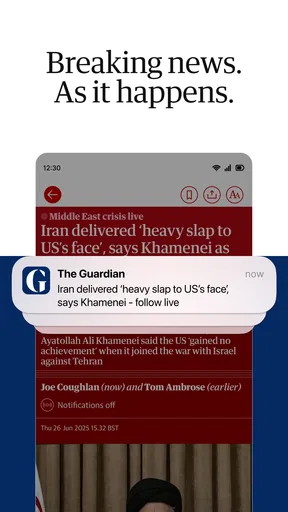
I would also think about how you react to alerts and live coverage. If you like checking developments as they unfold, those tools can make the app feel timely. If frequent news notifications leave you distracted, start with a restrained alert setup and let the app serve as a place you visit deliberately. A good news routine should help you understand events, not make you feel obliged to watch every update.
Where its range makes a difference
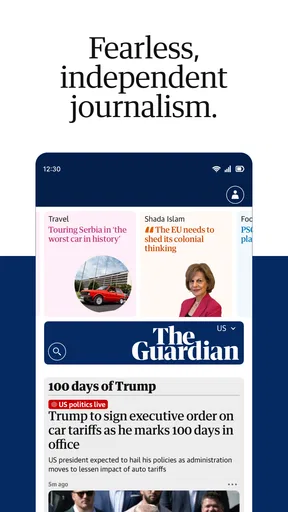
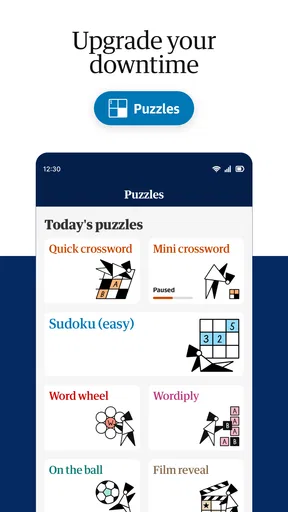
The app’s broad editorial mix is its clearest draw. Alongside reporting on major events, I can move into opinion and analysis, sport, podcasts and puzzles without treating each as a separate destination. That variety is handy when I have a little time to read but do not know which subject I want first. It also gives the app a different feel from a single-purpose breaking-news ticker: there is room to explore, not just to scan.
One practical way to use that breadth is to pair a quick headline check with one slower read. I might look at the leading stories over breakfast, then save a longer piece for a commute or a quiet break. The saved-article option makes that routine easier to manage, because an interesting story does not have to compete with whatever else I am doing at the moment. It turns browsing into a small reading queue rather than a promise to finish every article immediately.
Where another news app may fit better
Compared with a simple aggregator that pulls headlines from many publishers, The Guardian gives you a more coherent editorial voice and a direct route into its own reporting. That can be a benefit when I want context and a consistent perspective; it can be a limitation if my main goal is to compare how several outlets frame the same event in one place. For that kind of cross-publication scan, a multi-source reader may be a better companion.
There is a similar trade-off with broadcast-style news apps. A service built around brief alerts and quick summaries can be more efficient when all I need is the gist. The Guardian is more rewarding when I have time for a full article, an opinion piece or a podcast, but its range can feel like too much if I only want a one-minute update. I would choose according to the job: use a concise feed for a fast check, and this app when you want to spend more time with the story.
Build a routine without letting the feed take over
A realistic use case is a busy weekday: I check the top stories before leaving home, mute topics I do not need alerts for, and save one article that looks worth reading later. At lunch, I return to that piece instead of reopening the whole news cycle. If a major story is moving quickly, live updates can be useful; for ordinary days, I find it healthier to treat them as an option rather than the default way to follow everything.
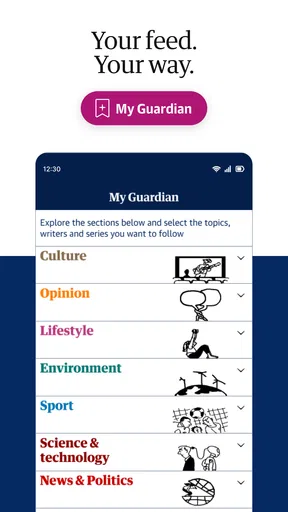
For a more focused experience, I would make a small habit of choosing a couple of subjects to explore instead of trying to read every section. That makes the app’s breadth an advantage rather than a source of overload. Podcasts can suit a walk or chores when looking at a screen is inconvenient, while puzzles offer a lighter change of pace. The trade-off is that switching between these formats can make a single session feel less focused, so it helps to decide whether you are opening the app to catch up, listen or take a break.
Readers who want a balanced mix of international news and deeper coverage are likely to get the most from it. People who prefer a narrowly personalized feed, want every publisher represented, or dislike commentary mixed into their news may find a dedicated aggregator or a more stripped-down news service easier to live with. The Guardian’s Everyone 10+ content rating is another useful point for households choosing apps for younger readers; I would still look at the particular stories and discussions a child may encounter rather than treating an age label as a substitute for parental judgment.
Getting Started with The Guardian App
First things first, downloading the app was a breeze. Available on both Android and iOS, The Guardian - US & World News app is free to download, though there are some optional in-app purchases and subscriptions. Once installed, I was greeted with a clean, user-friendly interface that made navigation a walk in the park. The home screen is well-organized, with sections dedicated to top stories, opinion pieces, and even a fun section for lifestyle content.
Features that Stand Out
One of my favorite things about the app is how customizable it is. You can tweak the notifications to get alerts for breaking news, sports updates, or even the latest in tech. I personally love getting those quick pings when something big happens. Plus, the app allows you to save articles to read later, which is perfect for those busy days when you just can't catch a break.
The Guardian app also offers a unique feature called "Daily Edition." This section compiles the top stories of the day and presents them in a newspaper-like format. It's like having the morning paper delivered right to your phone, minus the ink stains on your fingers!
Immersive Reading Experience
The reading experience on the app is top-notch. The articles are well-written and packed with insightful information. I found myself deep-diving into topics I wouldn't typically explore, thanks to the engaging headlines and thoughtful analysis. And the multimedia integration is impressive—videos, photo galleries, and podcasts are seamlessly woven into the articles, providing a richer understanding of each story.
For those who love to dive deeper, the app's "Explore" section is a goldmine. It offers a variety of topics from around the world, and I found myself exploring everything from environmental issues to financial markets.
Staying Connected with the Community
Another cool aspect of the app is the community feel. You can join discussions and comment on articles, which adds a social element to the news-consuming experience. It’s like having a mini social network of like-minded news enthusiasts right in your pocket.
But wait, there's more! The Guardian app comes with a live news feed that keeps you updated in real-time. Whether you’re interested in local politics or global crises, you can stay informed with minute-by-minute updates. It’s a feature that really makes you feel like you’re in the middle of the action.
What Could Be Better?
As much as I've enjoyed using The Guardian - US & World News app, no app is perfect. One thing I noticed is that the app can sometimes feel a bit cluttered, especially when there are a lot of live updates coming in at once. It’s a minor gripe, but something to be aware of if you prefer a more streamlined experience.
Additionally, while the app is free, some content is locked behind a paywall. This means you'll need a subscription to access certain premium articles. It’s understandable, given the quality of journalism, but it’s something to consider if you're budget-conscious.
Choosing whether to make it your regular reader
If you are moving from another news app, I would not replace your routine all at once. Try using The Guardian for the stories where its reporting and analysis appeal to you, while keeping a general aggregator for days when you need to compare coverage across publications. Save articles you genuinely intend to finish, and review that queue occasionally; otherwise, saved stories can become another backlog that makes reading feel like work.
The main friction is a combination of busy moments in the feed and the possibility of encountering paid content. The free download makes it easy to try, but it does not mean every article is necessarily available without payment. If you are deciding whether to spend, first notice how often you reach a limit and whether the pieces you want are worth paying for. Optional purchases vary widely in price, so check the purchase details in the app before committing rather than assuming every option costs the same.
It is also worth asking what you want from comments and discussion. They can add a sense of readers responding to a story, but they are not a substitute for reporting, and a lively thread may distract from the article itself. I would read the story first and open the discussion only when hearing other readers’ reactions is part of what I want from that visit.
Final Thoughts
Overall, The Guardian - US & World News app is a fantastic tool for anyone who wants to stay informed and engaged with the world around them. Its user-friendly design, customizable features, and in-depth content make it a must-have for news enthusiasts. Sure, it has its quirks, but the pros definitely outweigh the cons.
So, whether you're a die-hard news addict or just someone who likes to stay in the loop, I highly recommend giving this app a try. It’s like having a newsroom in your pocket, ready to deliver the latest headlines whenever you need them. Happy reading!
My recommendation is clearest for readers who want a familiar daily destination rather than a neutral dashboard of every outlet. I would start with a few alerts, use the Daily Edition when I want a more deliberate catch-up, and keep longer pieces for a time when I can give them attention. If I wanted only instant summaries or broad source comparison, I would choose a different kind of news app for that task. For readers who enjoy considered reporting and a varied mix of formats, though, this is a worthwhile app to try and make their own.
Privacy and Permissions
See what permissions an app requests and how it handles your data.
- Location
- approximate location (network-based)
- Wi-Fi connection information
- view Wi-Fi connections
- Other
- view network connections, full network access, read sync settings, run at startup, reorder running apps, control vibration, prevent device from sleeping, toggle sync on and off
Verdict
Strengths of The Guardian - US & World News
- Comprehensive news coverage.
- User-friendly interface.
- Customizable notifications.
- Offline reading mode.
- High-quality journalism.
Limitations of The Guardian - US & World News
- Frequent ads in free version.
- Limited access without subscription.
- Occasional app crashes.
- Content can be overwhelming.
- No dark mode available.
Other Releases by Guardian News & Media Ltd
View All
Guardian Feast: Daily Recipes
Food & Drink4.2
Similar Picks in This Category
View All
Google News - Daily Headlines
Google LLC4.0

X
X Corp.4.8

Flipboard:Your Social Magazine
Flipboard3.4

Opera News: breaking & local
Opera4.5

Hindi News by Dainik Bhaskar
Dainik Bhaskar Group4.0

Way2News Daily News App
Way2News ( Formerly Way2SMS )4.6
Frequently Asked Questions
Is The Guardian app free to download and use?
Yes, The Guardian app is free to download on both Android and iOS platforms. While most of the content is accessible for free, the app offers a premium subscription option for users who wish to enjoy an ad-free experience and gain access to exclusive content and features.
Does The Guardian app offer offline reading?
Yes, The Guardian app allows users to download articles for offline reading. This is particularly useful for those who wish to access news content without an internet connection, such as during commutes or while traveling. Simply save the articles you’re interested in before going offline.
Can I customize notifications in The Guardian app?
Absolutely, The Guardian app provides customizable notification settings. Users can choose to receive alerts for breaking news, specific topics, or updates from their favorite sections. This feature ensures that you stay informed without being overwhelmed by unnecessary notifications.
What types of content does The Guardian app offer?
The Guardian app provides a wide range of content including breaking news, in-depth analysis, opinion pieces, and multimedia such as videos and podcasts. It covers various sections like politics, sports, technology, culture, and more, catering to diverse interests and ensuring a comprehensive news experience.
How does The Guardian app ensure user data privacy?
The Guardian app is committed to protecting user data privacy. It adheres to strict privacy policies and uses encryption to secure user information. Users can also manage their data preferences within the app settings, ensuring transparency and control over personal information shared with the app.
